CoSpace turns your Mac or Linux server into shared dev spaces. Teammates join over plain ssh, and people and coding agents work in one place: the same files, the same Claude Code sessions, the same memory.
$ ssh shopfront
space@shopfront:~$ claude --resume
# every teammate's session, ready to pick up
Ready inside every space:
Claude CodeCodexGrok· and from your own editor:CursorVS Code Remote-SSHtmux
Why CoSpace
One place where your team and its agents work together
Coding agents keep their sessions and memory as plain files in the home directory. Give everyone the same home, and collaboration comes for free.
People and agents, side by side
One space holds one shared home, so every session is visible to everyone in it.
claude --resume lists everyone's sessions
Take over a teammate's run with full context
Watch or pair live with tmux attach
Commits stay attributed to each guest
A working agent in a minute
Guests install one small file and pair once. After that, a space is one ssh away.
No account, no API key, no IDE to install
Claude Code, Codex and Grok ready on login
macOS, Linux and Windows guests
Full-auto agents, inside a fence
Each space is its own Linux VM, so agents can run without permission prompts.
Full-auto mode on by default, per space
Dollar budget and concurrency cap per space
Host credentials never enter a space
How it works
Three steps from install to a shared session
The host runs the daemon. Guests only need ssh and the small cospace tool.
Install the host
One command on an Apple Silicon Mac or a Linux server. The console opens in your browser.
$ curl -fsSL cospace.jingxuan.uk/host.sh | sh
# installs the runtime and the daemon
Console: http://127.0.0.1:18931
Create a space, invite a guest
Click New Space, then Invite a Guest. Send the link; it holds a one-time pairing code.
# or from the CLI$ cospaced space create shopfront
$ cospaced invite shopfront
# prints the lines to send your guest
Guests ssh in
The guest pairs once. From then on, the space works like any other ssh host.
$ cospace pair <host> <code># pins the space's host key, adds the ssh alias$ ssh shopfront
space@shopfront:~$ claude
Features
The host stays in control
Everything a host needs to open a shared workspace to people they trust, and to close it again in one click.
Budgets per space
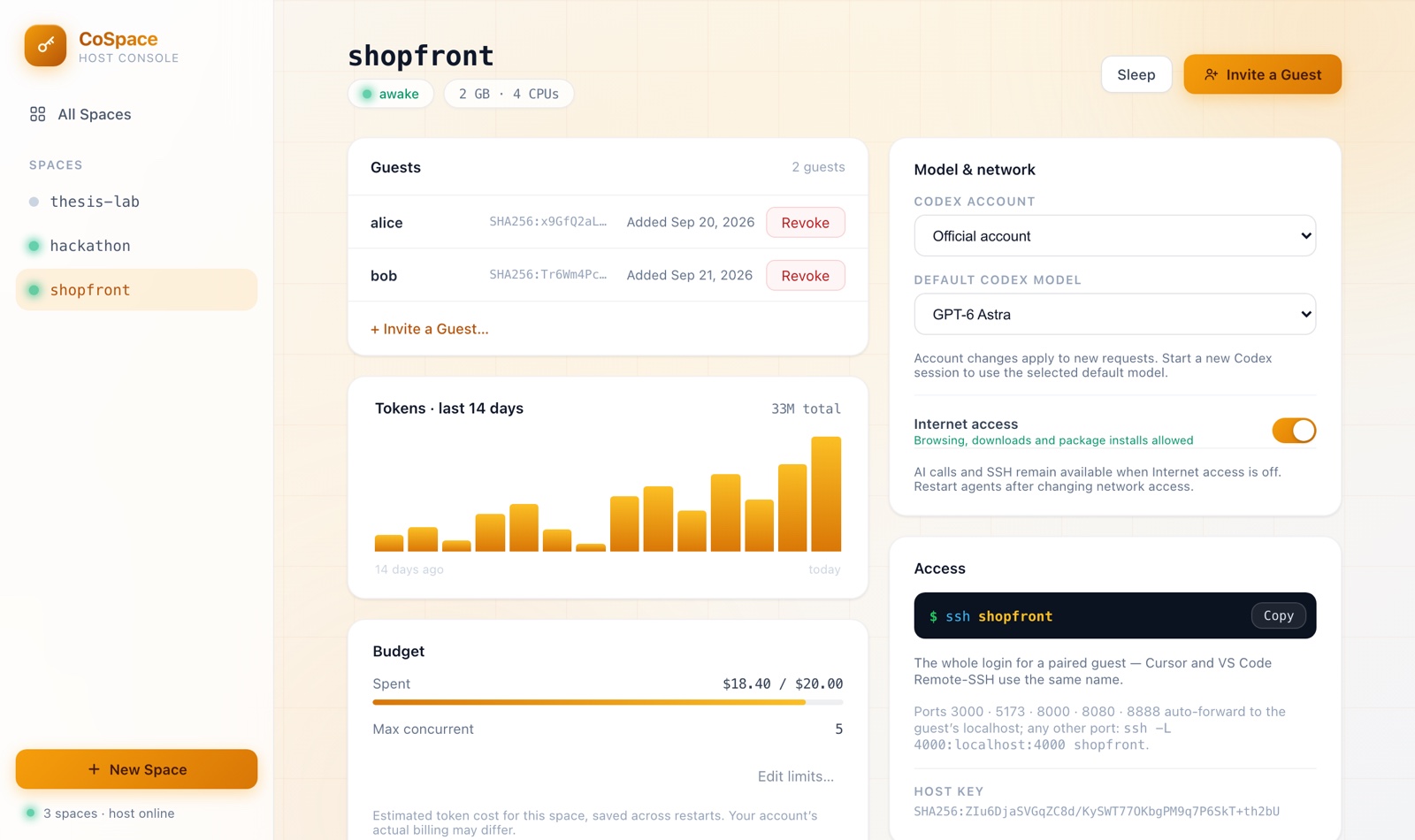
Set a dollar cap and a concurrency cap for each space. Requests over the limit get a clean 429.
Revoke in one click
Each guest has their own key. Revoking it cuts their access immediately.
Usage at a glance
A 14-day token chart and an estimated cost for every space.
Templates
Save a space's size, AI selection, model, network, budget and full-auto setting. Stamp out identical spaces.
Internet switch
Turn off outbound Internet for a space. SSH and the AI gateway keep working.
Sleeps when idle
Idle spaces sleep to free memory and wake on the next connection.
Your own editor
Cursor and VS Code Remote-SSH connect by space name. Common dev ports forward to the guest's localhost.
Peer-to-peer
Guests connect peer-to-peer through an embedded Tailscale library, with Tailscale's relays as a fallback. There is no CoSpace server in the middle.
Mac or Linux host
Apple container on macOS 26 or later, Docker on Linux. One VM per space, with a persistent volume.
Architecture
Everything runs on the host's machine
A single Go daemon runs the console, the AI gateway and the spaces. Guests reach a space over ssh; agents in the space reach AI providers only through the gateway.
Security
Clear boundaries, stated up front
CoSpace is built for people you trust. It still keeps the host's machine and credentials out of reach.
Real provider credentials stay in the gateway process on the host. A space only holds its own token, which the host can revoke at any time.
A space cannot see the host's home directory, other spaces, or the host's git and ssh identity.
Every space has its own ED25519 host key. The guest tool pins it, so guests never accept an unknown key.
The console refuses cross-site requests and unexpected Host headers. The gateway only answers the host and its spaces.
No CoSpace cloud: binaries and install scripts are published on GitHub, and connections are peer-to-peer.
Shared by design. The host can see everything inside a space: it is a team workspace, not a private VM. Guests use AI quota the host provides. So invite people you trust, and set a budget for each space.
Get started
Install in one command
The same command upgrades an existing install. Everything is published on GitHub.
Host
Installs the container runtime if needed, the cospaced daemon as a service, and opens the console.
# macOS 26+ (Apple Silicon) or Linux with Docker
curl -fsSL https://cospace.jingxuan.uk/host.sh | sh
First run downloads the space image once (about 600 MB). New spaces then start in seconds.
Guest
Installs the cospace tool (alias co). Then run the pairing line your host sends you.
# macOS / Linux
curl -fsSL https://cospace.jingxuan.uk/install.sh | sh
The host provides the AI quota for their spaces. Each space has a dollar cap and a concurrency cap, and the console shows the estimated cost per space. The estimate uses list prices; the host's actual bill may differ.
Is CoSpace a cloud service?
No. Spaces, the console and the gateway all run on the host's own Mac or Linux server. Install scripts and binaries are published on GitHub, and guests connect peer-to-peer. There is no CoSpace server that sees your code or traffic.
Do guests need an account?
No. A guest installs one small tool, pairs once with a one-time code, and then uses plain ssh. Cursor and VS Code Remote-SSH work with the same space name.
Can the host see my work?
Yes. A space is a shared team workspace, and the host can see everything inside it. Do not use a space for anything you would not share with the host.
Which tools are inside a space?
Claude Code, Codex and Grok come preinstalled and ready, together with git, gh, curl and the usual build tools. Agents can install anything else with apt, npm or pip.
What does CoSpace cost?
CoSpace is free and open source under the MIT license.
Open a space for your team
One command on your machine, one invite link, and your team is coding with agents in the same place.